Garmin is the coach's main source of recorded data: without it, your plan is based only on what you tell the coach; with it, the coach can also use your heart rate, sleep, and actual training volume.
What 1trAIner does with your Garmin data
1trAIner pulls your workouts and daily recovery metrics — sleep, HRV, resting heart rate, Body Battery and training readiness — from Garmin Connect and adjusts your plan based on them. After poor sleep, lowered HRV or a high acute load, the AI coach reduces intensity or volume or schedules recovery; when readiness is good, it gives you quality work.
- Workouts — type, distance, pace, heart rate and heart-rate zones, splits, elevation gain: after each workout the coach sends you its review in Telegram and checks the result against the plan.
- Recovery — sleep and sleep score, HRV, resting heart rate, Body Battery, stress, morning and training readiness, acute load: the plan is rebuilt overnight from these, so in the morning your daily workout reflects how well you recovered.
- Fitness — VO2max, race predictions and threshold values: the coach sees them alongside the plan as a reference for your current fitness.
HRV and the other metrics serve here as a recovery reference for planning your training load, not as a medical diagnosis. The full list of data is in the “What syncs” section below.
COROS and Polar watches are connected separately: “Connecting COROS” and “Connecting Polar”.
How to connect
- Log in to your dashboard at 1trainer.ru and open the account menu — the avatar in the top right corner, "Connections" item (direct link: 1trainer.ru/sport#/profile/integrations), Garmin tile.
- Enter your Garmin Connect username and password in the connection form.
- Click "Connect" and wait for a response — this usually takes a few seconds.
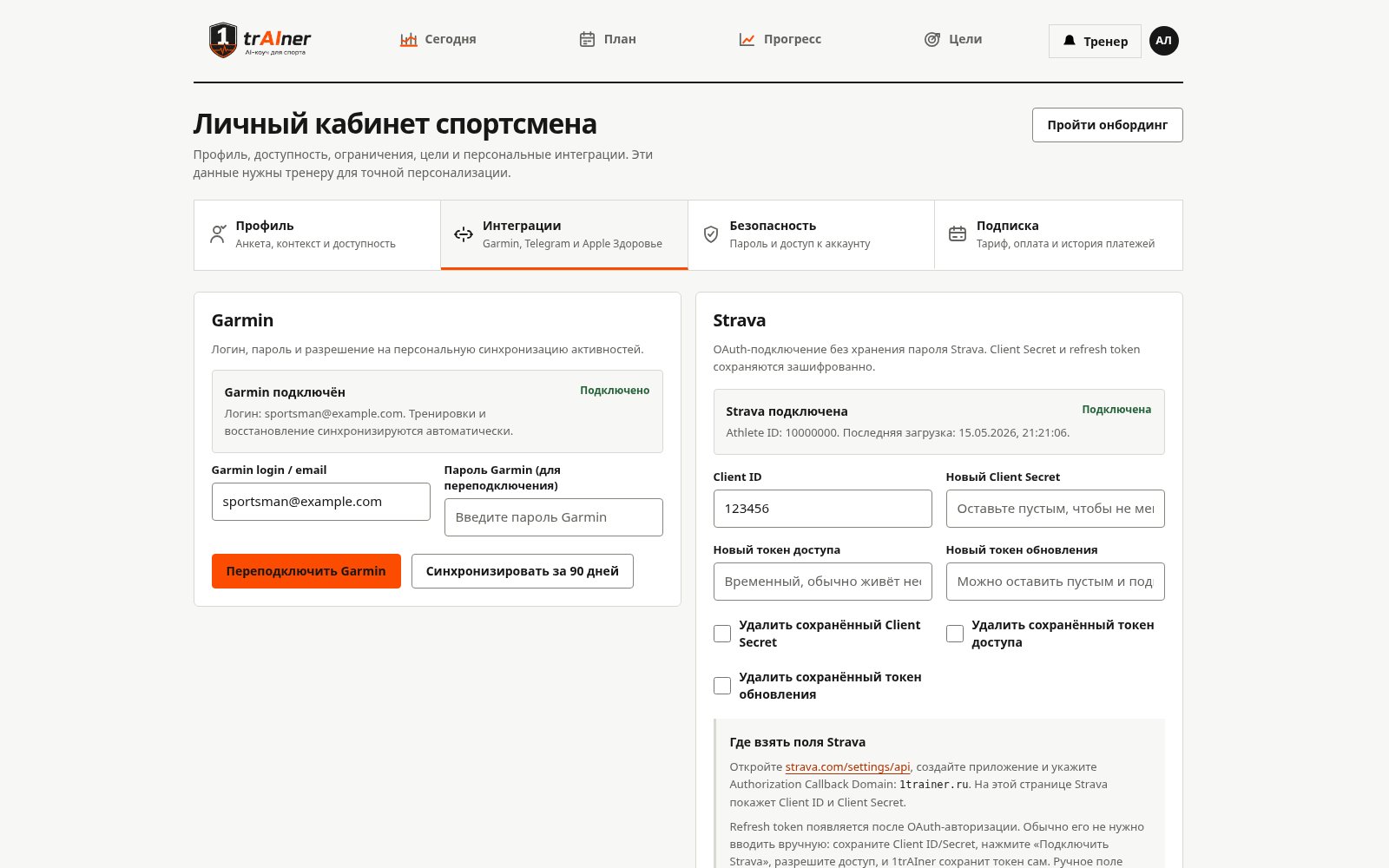
The password is entered only in the secure dashboard form and is stored in the database in encrypted form. You don't need to send it to the coach in chat — the bot doesn't accept or request such data.
Sign-in verification code
Connection often takes two steps: after you enter your login and password, the form asks for a verification code. Garmin sends it to the email of your Garmin account (or by SMS or to an authenticator app) when it sees the first sign-in from a new device — for Garmin, that is our server. This happens even when two-factor protection in your Garmin settings is turned off: there is no need to look for it or turn it on.
- Enter the six-digit code in the field that appears and confirm.
- If you see "Invalid or expired code", request a new code and try again.
- Once the code is accepted, the connection is complete and the service immediately starts importing the last 30 days of data.
The code is valid for about 10 minutes, and the form shows a countdown: "Code valid for m:ss more". The form will tell you where Garmin sent the code: to the email of your Garmin account (with that email's domain), by SMS, or to an authenticator app.
If you don't enter the code within 15 minutes, the connection won't be completed, and you'll get an email titled "Garmin connection not completed" — just connect Garmin again.
The verification code doesn't arrive
- Check your Spam and Promotions folders. Garmin emails to Mail.ru mail services (mail.ru, list.ru, bk.ru, inbox.ru, internet.ru) are sometimes delayed by a few minutes or end up in spam.
- Check your Garmin username and password. With a wrong password, Garmin still shows the code prompt but doesn't send the email.
- Make sure which email is listed in your Garmin account: the code goes there, not to the email you registered with in 1trAIner. You can check and change the address in your Garmin Connect account settings.
- In Garmin's security settings you can choose SMS or an authenticator app — then the code will arrive there, with no waiting for an email.
- If the code still hasn't arrived, click "Resend code — it hasn't arrived" in the form — no more than once a minute: each request invalidates the previous code, and Garmin blocks frequent requests.
- The message "Time to enter the code has expired" means more than 10 minutes have passed: click "Resend" and enter the new code.
What syncs
- workouts: type, distance, duration, pace, heart rate, elevation gain, heart rate zones, splits;
- sleep and its score;
- heart rate variability (HRV) and resting heart rate;
- Body Battery, stress level, steps and intensity minutes;
- training and morning readiness, training status, acute training load;
- VO2max, race predictions and threshold metrics;
- weight and body composition — from Garmin Index scales or from weight entered in Garmin Connect (including weight synced there from other apps); updated roughly every 6 hours, and on first connection 5 years of weight history are pulled in.
On first connection, 30 days of workout history are pulled in — the coach immediately has something to work with.
How often data updates
The service fetches data regularly in the background, but it only appears at the source after the watch has synced with the Garmin Connect app on your phone. So the morning ritual is simple: open Connect, wait for the sync — and the coach sees your sleep and readiness for the night.
Daily summaries (sleep, Body Battery, readiness) arrive with a delay. If you look at the numbers before the morning sync, you'll see yesterday's.
If there's no data
- Sync your watch with the Garmin Connect app.
- Message your coach in the chat: "update data from the watch" or "recheck Garmin". The coach has a separate tool that forcibly re-requests today's and yesterday's daily metrics and replies based on the fresh numbers.
- If it's still empty after that, open the Garmin tile in "Connections". It has "Reconnect" (needed after you change your Garmin password), "Import again" (reloads the last 90 days), and "Disconnect" buttons.
Other sources
Polar watches are connected separately — see “Connecting Polar”. COROS watches — see “Connecting COROS”.
Besides Garmin, the service accepts weight and body composition from the 1trAIner iPhone app (Health data), from smart scales via a personal URL, and from photos of the scale display sent straight to the chat: the coach recognizes weight, body fat percentage, and muscle mass and records them in the diary. For details, see "Nutrition and weight".
FAQ: Garmin and the AI coach
What Garmin data does the AI coach use?
Workouts — type, distance, duration, pace, heart rate, heart-rate zones, splits and elevation gain — and daily metrics: sleep, HRV, resting heart rate, Body Battery, stress, morning and training readiness, acute load, plus VO2max, race predictions and threshold values. When you connect, the last 30 days of history are imported.
Are HRV and sleep taken into account?
Yes. Sleep, HRV, resting heart rate and readiness go to the planner: after poor sleep, lowered HRV or a high acute load, the AI coach reduces intensity or volume or schedules recovery. HRV here is a recovery indicator for planning your training load, not a medical diagnosis.
How often is the plan recalculated?
At night the service fills in any missing plans as a cascade — month, week, day — and by default your daily plan arrives at 07:00 Moscow time. In the dashboard each horizon has a replanning button, and after every workout the coach sends you its review in Telegram.
What should I do if my Garmin data didn't arrive?
Sync your watch with the Garmin Connect app and message your coach in the chat: “update data from the watch”. If there is still no data, check in the dashboard that the integration is active — see the “If there's no data” section above and the “What to do if…” block.
Do I need a Garmin to use 1trAIner?
No. The plan is built without a watch too — from your answers about your goal, level and available time. With Garmin it is more precise: the coach sees your real heart-rate zones, recovery and volume. Other watches work as well — Polar, COROS and Apple Watch.